Unlock the Full Potential of Your Robot Vacuum A Step by Step Guide
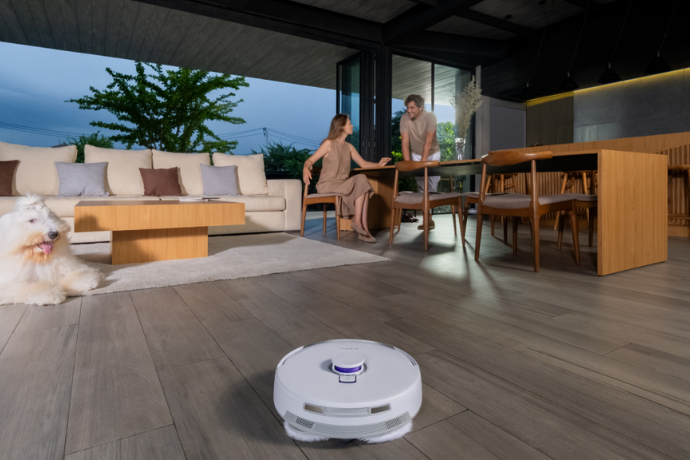
A modern robot cleaner is more than a simple vacuum; it is a sophisticated home assistant. To truly benefit from its capabilities, you need to master its smart features. The key to this is the device’s companion mobile app, which acts as a central command hub for all cleaning operations.
By learning to use the app effectively, you can transform your daily cleaning routine. This guide will walk you through the essential features, from initial home mapping to creating a fully automated cleaning schedule. This ensures your home remains spotless with minimal daily effort.
The Hub of Your Cleaning: Mastering App Control
Your journey begins with the mobile application. This powerful tool is the brain behind your robot’s operations. After connecting your device to your home’s Wi-Fi network and pairing it with the app, you gain complete control over its functions.
The app’s interface is designed for intuitive use, allowing you to initiate, pause, or stop a cleaning cycle from anywhere. It is the platform where you will access all advanced settings, including mapping, zone management, and scheduling. Familiarizing yourself with its layout is the first step toward a fully automated home.
Creating a Smart Map of Your Home
Before you can use advanced features, your robot must understand your home’s layout. This is achieved through an initial mapping run. During this process, the robot methodically navigates every accessible area, using its sensors to build a detailed digital map within the app.
For homes with multiple levels, the multi-floor mapping capability is essential. The device can create and save a unique map for each floor. When you move the robot to a different level, it automatically recognizes the space and uses the correct map, ensuring efficient and accurate cleaning every time.
Customizing Your Clean: Zones and Room-Specific Settings
Once your maps are saved, you can begin personalizing the cleaning process. This level of customization ensures the robot operates exactly how and where you want it to, giving you unparalleled control over your home environment.
Defining Boundaries with No-Go Zones
Every home has areas where a robot shouldn’t venture. This could be a space with delicate furniture, a collection of floor cables, or the area around a pet’s food and water bowls. Using the app, you can draw virtual boundaries directly onto the map to create no-go zones.
These zones instruct the robot to avoid specific areas entirely during its cleaning cycles. You can also define zones where only vacuuming is permitted, protecting sensitive rugs from mopping. This feature provides peace of mind and protects your belongings.
Tailoring the Clean for Each Room
Different rooms have different cleaning needs. A tiled kitchen may require both vigorous vacuuming and mopping, while a carpeted bedroom only needs vacuuming. The app allows you to name each room on the map and set specific cleaning preferences for it.
You can adjust suction power, water flow for mopping, and the cleaning mode (vacuum, mop, or both) for each individual room. This ensures that every part of your home receives the precise level of attention it needs for an optimal clean.
Automating Your Routine: The Power of a Cleaning Schedule
The ultimate convenience of a robot cleaner is its ability to operate on its own. The cleaning schedule feature allows you to set up a completely hands-off cleaning routine that fits your lifestyle. This ensures your floors are cleaned regularly without you needing to initiate a cycle each time.
Setting Up Your First Schedule
Creating a schedule is a straightforward process within the app. You can establish a new automated cleaning task in just a few steps:
- Navigate to the “Schedule” menu in the app.
- Select the desired time for the cleaning to start.
- Choose the days of the week you want this schedule to run.
You can create multiple schedules for different days and times. For example, you can set a light clean every weekday morning and a more thorough clean for the entire house over the weekend.
Advanced Scheduling Options
A powerful scheduling system goes beyond just time and day. You can assign specific tasks to each schedule you create. This includes choosing the cleaning mode, such as vacuuming only, mopping only, or a combined vacuum and mop cycle.
Furthermore, you can select which specific rooms the schedule applies to. You could program the robot to clean only the kitchen and dining area every evening after dinner or to vacuum the living room before you get home from work. This customization makes automated cleaning incredibly efficient.
Managing Your Schedules
Your lifestyle can change, and your cleaning schedule should be flexible enough to adapt. The app allows you to easily manage all your saved schedules. You can edit an existing schedule to change its time or targeted rooms.
If a schedule is no longer needed, it can be deleted. You also have the option to temporarily disable a schedule without deleting it, which is useful when you have guests or a change in your routine. This ensures you are always in complete control.
Putting It All Together for a Seamless Experience
By combining these smart features, you create a truly automated and responsive cleaning system. Multi-floor mapping provides the foundation, no-go zones add a layer of safety, and room-specific settings deliver a tailored clean. A well-planned cleaning schedule ties it all together, ensuring your home is consistently clean.
This intelligent approach to home maintenance saves you time and effort. As you consider investing in this technology, it is helpful to explore your options with a trusted source. For those planning their smart home journey, further guidance from a specialist like Narwal Australia can help you make an informed decision and start on the right foot. Mastering these features will make your robot an indispensable part of your home.
Disclaimer
The information provided in this article is for general informational and educational purposes only. While every effort has been made to ensure the accuracy and reliability of the content, features, settings, and performance of robot vacuum cleaners may vary depending on the brand, model, software version, and home environment. Readers are advised to refer to the manufacturer’s official documentation, user manuals, and support resources for specific instructions and safety guidelines. The author and publisher are not responsible for any damage, malfunction, or loss resulting from the use or misuse of the information presented in this guide. Any brand or product references are for illustrative purposes only and do not constitute an endorsement.